
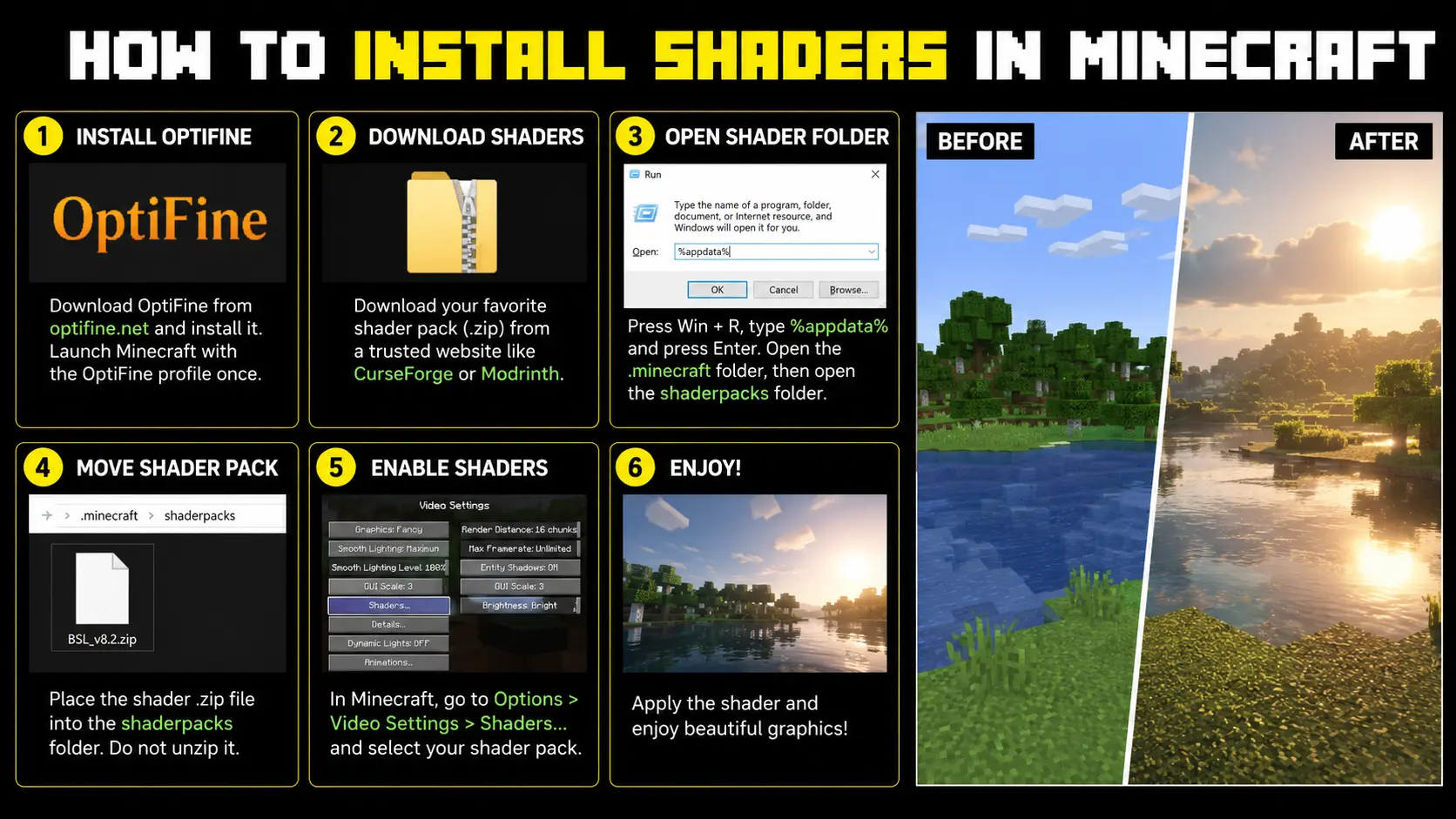
How to Install Shaders in Minecraft?Vanilla Minecraft looks fine enough, but then you turn around and see how the sun shines off running water, or that it creates actual shadows along a cornice up high on some mountain flanks. Getting shaders up and running in Minecraft seems to be more complex than it actually is in most guides, but if you want the maximum from your copy of Minecraft,Java Edition then we’ve got what you need.
What Shaders Actually Do
Shaders are short programs that modify how your GPU renders the game world. On top of Minecraft’s basic 3D textures they then layer free flowing shadows, water reflections, volumetric fog, and true to life sun and moon lighting.
Are Shaders Safe to Use
All of this is purely graphical and has no bearing on gameplay or your world saves. It doesn’t affect how anything actually works, it just affects how everything you see on screen is drawn and displayed.
What You Need Before Starting
A few things need to be ready before you dive into how to install shaders Minecraft Java requires. You need a legal, working copy of Java Edition, since third party shader loaders do not run on the mobile or console version of the game.
Check Your Minecraft Version First
Shader packs and loaders are version specific, so knowing your exact build matters. As of mid 2026 the current stable release is 26.2, though many players still ask specifically how to install shaders Minecraft 26.1.2 since that build saw a longer run before the newer drop replaced it.
Hardware You Will Need
A dedicated graphics card helps a lot here. Integrated graphics can technically run lighter shader packs, but anything with heavy ray tracing style effects will struggle without a real GPU.
Installing Shaders With OptiFine
OptiFine has been the classic answer to how to install shaders in Minecraft for years, mainly because it needs no separate mod loader. Download it from the official site for your exact version, then run the installer.
Setting Up Your OptiFine Profile
The installer automatically creates a new profile in your Minecraft launcher. Open that profile and start the game once so the required files generate properly before you go any further.
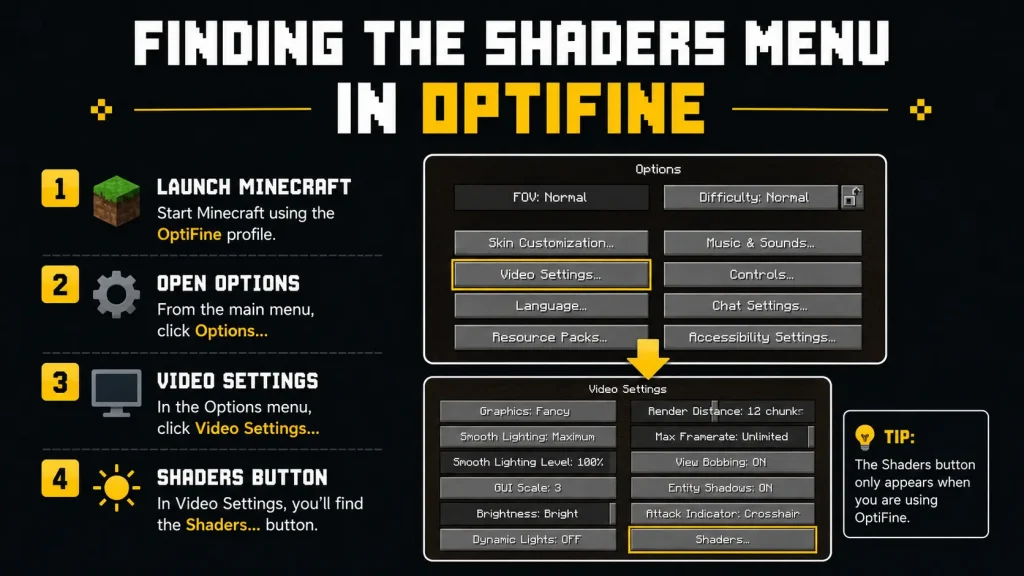
Finding the Shaders Menu in OptiFine
From the main menu go to Options, then Video Settings, then Shaders, and click Shaders Folder. This opens the exact folder Minecraft reads shader packs from.
Loading a Shader Pack Into OptiFine
Download any shader pack as a zip file and do not extract it. Drop the zip straight into the shaderpacks folder, return to the in game menu, and click the pack once to load it.
Installing Shaders With Iris and Fabric
Iris has become the preferred route for players who care about frame rate. It runs alongside Sodium, a performance mod that noticeably boosts FPS on the same hardware, and understanding how to install shaders in Minecraft through this route just takes a couple of extra steps.
Setting Up Fabric for Iris
Install the Fabric Loader for your Minecraft version first. Then download Iris Shaders, which usually comes bundled with Sodium, and place the jar file into your mods folder.
Loading a Shader Pack Into Iris
Launch the Fabric profile instead of the vanilla one, then go to Video Settings, then Shader Packs, and click Open Shader Pack Folder. Drop your shader zip inside and select it from the in game list.
Why Iris Does Not Work on Forge
Iris simply does not run on Forge based setups. If your modpack is built on Forge, look at Oculus instead, since it is essentially an unofficial Forge port of Iris.
How to Install Shaders on Minecraft Without Forge
Plenty of players specifically search for how to install shaders Minecraft without Forge, usually because they do not want extra mod dependencies. Both main routes already avoid Forge entirely, since OptiFine is standalone and Iris runs on Fabric.
Can You Install Shaders on Minecraft Bedrock
A common question tied to how to install shaders Minecraft Bedrock players ask is whether it works the same way. It does not, since Bedrock Edition blocks third party rendering mods like OptiFine and Iris entirely.
Bedrock’s Built In Alternative
Bedrock does offer built in visual features like Vibrant Visuals on supported hardware. These approximate some shader style lighting without needing any external installation at all.
Finding Your Shaderpacks Folder Manually
Both OptiFine and Iris pull shaders from the same default location, a folder named shaderpacks inside your main .minecraft directory. This matters if your launcher hides the in game shortcut.
Quick Steps to Locate the Folder
- On Windows, open File Explorer and paste %appdata%.minecraft into the address bar.
- On macOS, open Finder, click Go in the menu bar, then choose Go to Folder and type ~/Library/Application Support/minecraft.
- Look inside for a folder named shaderpacks, and if it is missing, open the in game shader menu once to have the game create it automatically.
- Drop new shader zip files directly into this folder without unzipping them.
- Restart Minecraft if a newly added pack does not appear right away.:
How to Install Shaders in Minecraft? Step by Step
- Install Fabric (fabricmc.net) or Forge — pick your Minecraft version, run installer.
- Install Iris (for Fabric) or OptiFine (for Forge/vanilla) — download matching your MC version.
- If using Iris, also download Fabric API and drop both
.jarfiles into yourmodsfolder (%appdata%\.minecraft\modson Windows). - Download a shader pack (e.g. BSL, Complementary, SEUS) as a
.zip— don’t extract it. - Launch Minecraft using the Fabric/Forge/OptiFine profile.
- Go to Options > Video Settings > Shaders > Shaderpack Folder, drop the zip file there.
- Select the shader from the in-game list — done..
OptiFine vs Iris: Which One Should You Use
Choosing between the two comes down to what you already run and how much performance matters. The table below breaks down the practical differences at a glance.
| Factor | OptiFine | Iris with Fabric |
| Setup difficulty | Very simple, single installer | Slightly more steps, needs Fabric first |
| Performance | Standard, no built in optimization | Better, thanks to Sodium pairing |
| Mod compatibility | Works with many older mods | Best with Fabric mod ecosystem |
| Update speed | Often lags behind new versions | Usually updates faster |
| Works on Forge | Yes, where builds exist | No, use Oculus instead |
| Best for | Vanilla style, casual play | Modded setups, higher FPS goals |
Types of Shader Packs to Know
Realistic packs aim for lifelike water and sky colors but tend to be the heaviest on system resources. Vibrant or fantasy style packs push saturated colors while running noticeably lighter.
Picking Your First Shader Pack
If this is your first install, start with a lightweight or medium tier pack rather than the heaviest option available. This gives you a baseline for how your hardware handles the extra rendering load.
Popular Shader Packs Worth Trying
Complementary Shaders offers a balanced look that runs well on mid range hardware. BSL Shaders leans more cinematic, and SEUS is built for players chasing the most realistic lighting on a strong GPU.
Keeping Shaders Updated
Shader packs get updated fairly often to fix bugs and stay compatible with new Minecraft releases. Give developers a little time after a fresh drop before assuming a pack is broken.
When a Shader Suddenly Stops Working
A shader that disappears right after a Minecraft update is almost always a version mismatch. Checking the shader’s official page is usually faster than troubleshooting it yourself.
Fixing Common Shader Problems
If a shader does not appear in the list, confirm the zip file was placed directly in the shaderpacks folder and never extracted. If the game crashes after adding one, it is likely built for a different Minecraft version than yours.
Improving FPS With Shaders On
If frame rate drops sharply, lower the shader preset from ultra to medium or low. Allocating more RAM, typically four to six gigabytes, through your launcher settings also helps heavier packs run smoothly.
Update Your Graphics Drivers Too
Outdated graphics drivers are a surprisingly common cause of crashes and visual glitches. Update them before assuming the shader pack itself is broken.
Final Thoughts
Understanding how to install shaders in Minecraft comes down to picking OptiFine for a quick upgrade or Iris with Fabric for stronger long term performance. Both methods take just a few minutes and read from the same shaderpacks folder no matter which pack you try next.
FAQs
Do shaders cause lag in Minecraft?
Yes, shaders can lower your frame rate since they add extra rendering work for your GPU, though lighter packs and lower presets keep the impact small on most modern computers.
Can I use shaders on a multiplayer server?
Yes, since shaders are entirely client side, you can run them on any server without needing the server itself to support or install anything.
Do I need Forge to use shaders?
No, both OptiFine and Iris work without Forge. Forge is only needed if you specifically want to use Oculus alongside a Forge based modpack.
Where do I put shaders in the Minecraft folder?
Shaders are put inside the shaderpacks folder within your. minecraft directory. On Windows, paste %appdata%. Place the shader zip file inside without unzipping by pasting it into > C:Users{your_username}AppDataRoaming.mincraft, perform a search for File Explorer minecraft and go to %appdata% then see shaderpacks
Do you need OptiFine to install shaders?
Optifine is not the only option you could train on. You can get shaders installed through either OptiFine or Iris (the latter being the option on Fabric, where it’s actually much faster because it runs with Sodium).